01 / SINGLE COLOUR
Single-colour finishing
01:28Select CAD surfaces, exclude cavities from painting, prepare paths and analyse film thickness on the front, back and edges of the body.
Watch on YouTube ↗SVG Sound Research sp. z o.o. / systems integrator
Software and robotics
for finishing technology.
The system on a production line
See how SCAN2SPRAY connects finish design, spray programming and coating analysis with robotics and workpiece transport. The layout includes a body buffer, automated loading, G5 positioning, painting and transfer to the outfeed conveyor.
Explore the softwareAn example integrating PRISMATEC software with YASKAWA robotics and TECNOVA equipment. Transport, tooling and workpiece-handling arrangements are tailored to the production workflow.
Visualisation of an example production integration. The film shows a process simulation; the repeated production sequence is accelerated.
Explore the software capabilities
Planning · spray application · colour · analysis01 / Robot cell
A shared model of the robot, positioner and body lets you prepare the process for the complete guitar geometry.
Explore the cell configuration ↗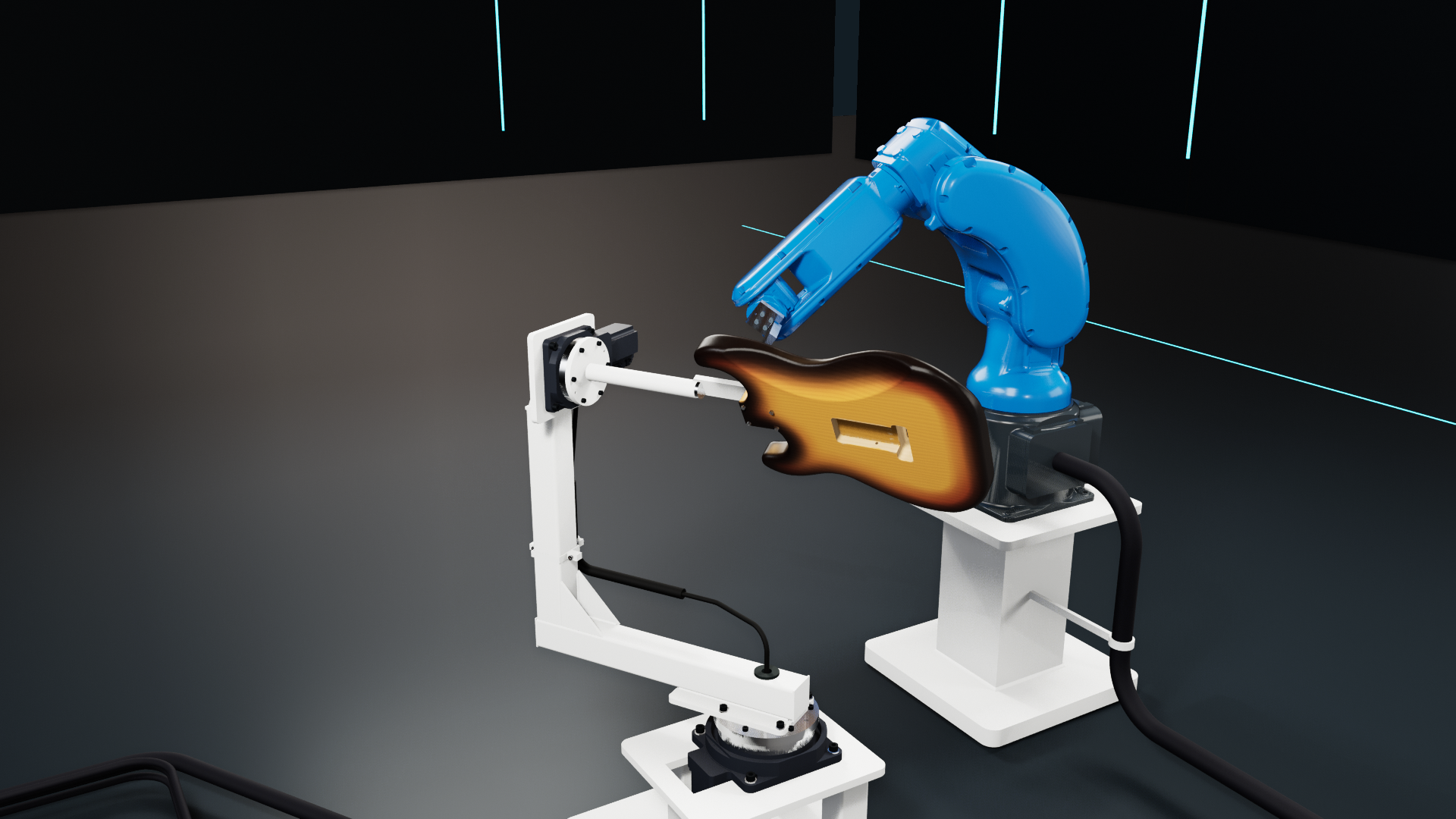 SCAN2SPRAY / G5
01 / Technology integration
SVG Sound Research sp. z o.o. combines software, robotics and spray application technology in a solution tailored to your production requirements.
Integrator · application, tooling and implementation
Software · process planning and modelling

Robotics · robot motion and external axes
02 / The process in practice
Single-colour body finishing and multistage sunburst demonstrate how the same CAD, planning and analysis tools support different coating processes.
Select CAD surfaces, exclude cavities from painting, prepare paths and analyse film thickness on the front, back and edges of the body.
Watch on YouTube ↗An amber base, light red passes, a dark perimeter and optional clearcoat. Separate colour programs with a preview of the coating as it builds up.
Watch on YouTube ↗The films show the simulation and software, rather than a physical installation in operation. Production parameters are validated during commissioning trials using the intended workpiece and coating material.
03 / SCAN2SPRAY
From CAD surface selection to a versioned program and report. Choose a work area to explore the available parameters and their role in process preparation.
Geometry → process scope
Import STEP/STP or STL files, manage a model library and position the part in the cell. STEP data supports selection of CAD faces to define the spray scope and exclude pockets or cavities.
The painting scope is part of the process data. It remains available when revising a model or formulation.
04 / Spray simulation model
For deployed systems, we use real spray patterns from the gun installed in the cell. We scan test patterns at different settings and use them to calibrate the simulation model for that installation.
The long axis of the spray fan runs across the direction of travel. Adjacent passes overlap by the specified amount.
We scan spray patterns produced by the actual gun and nozzle across an agreed range of settings. The recorded shape and material distribution are used to represent the spray characteristics in the software.
Speed determines how long the spray acts on each area. Standoff, angle of incidence, fan orientation and surface occlusion affect local material deposition.
Contributions from passes and coats accumulate on a grid of surface sampling points. The solids content of the diluted formulation converts wet film thickness into a predicted dry film thickness.
Calibration against the real process
SVG Sound Research sp. z o.o. performs calibration on the production cell at the customer's factory. We first agree the process with the customer, then align the model with the actual gun, nozzle, coating material and trial results.
We carry out a series of spray trials with the installed gun at agreed settings, recording the parameters and conditions for each trial.
We scan the real spray patterns and supplement them with coating measurements, recording band width, material distribution and the gradual fade at the edges.
Our team adjusts the spray profile and transfer parameters by comparing measured and simulated values at the same points.
Validate with an independent trial and save the configuration. A different nozzle, material or set of conditions starts a new controlled iteration.
The integrator calibrates and validates the model as part of implementation. Subsequent changes to the material, nozzle or process are reviewed and tested on the cell to keep the model aligned with production.
05 / Local coverage assessment
The base coat illustrates how to read the simulation results. Map colours represent dry film thickness in micrometres. Switch body views to compare coverage on faces and edges.
Dry film · µm · range 0–150
Base coat / simulation result
On flat faces, look for an even distribution. At rounded transitions, the angle of incidence and pass overlap change, so the edges also need assessment.
Lower film thickness. Compare it with the process target to identify areas that need adjustment.
Greater film thickness. Check pass overlap and areas with increased material build-up.
A cavity excluded from path planning does not have the same coverage target. Exclusion does not replace masking or eliminate possible overspray.
All base-coat views use the same 0–150 µm scale. Compare values against the legend and the target film thickness.
Follow the passes and their overlap. A local low spot may be hidden by the mean for the entire surface.
Assess the spray angle and the combined contribution of face and edge passes.
Identify local thickness differences, adjust the parameters and compare the new simulation result.
06 / Example G5 configuration
Select a component. The robot guides the gun while the positioner changes the body's orientation. The fixture provides access to the front, back and perimeter within a single process program.
Tool motion
The motion program defines the gun's position and orientation relative to the body. Cell geometry and the tool provide a common reference for planning and simulation.
Interchangeable fixture
The fixture carrying the guitar will slide over the positioner arm's tube and lock in a defined orientation. The next body can be prepared outside the cell, then loaded by exchanging the complete fixture assembly.
The locking method, dimensions and locating repeatability are selected for the part and agreed in the implementation design.
The booth, extraction, dosing, automation and loading arrangements are selected for each cell project. The visualisation shows the robot and tooling layout.
07 / Configuration scope
Adaptation is based on part geometry, coating technology, required takt time and factory infrastructure. The shared software environment supports the configuration prepared for each installation.
CAD models, selected surfaces, part orientation, rotary table or tilting positioner; fixtures for bodies, necks and other part families.
Models and settings in the software. Dedicated fixtures, spray access and mechanical mounting are designed and qualified as part of the project.
Materials, target thickness, coat count, edges and faces, cross-coating passes, flow rate, speed, fan width, overlap and standoff.
Parameters and formulations in the application. Gun, nozzle, supply system and operating ranges are selected to suit the coating technology.
Separate colour sequences, two- and three-colour sunburst, band widths, transition softness, thin coats and optional clearcoat.
Stage design in the software. An independent controller handles colour changes and flushing, using readiness signals agreed during integration.
Robot and external-axis models, coordinate systems, tool, spray logic, loading sequence and interfaces to cell equipment.
Configuration for the target controller. Export adaptation, I/O signals, PLC integration, cycle logic and on-site commissioning are part of implementation.
Program library, formulation versions, orders, quantities, handling time and result documentation. Standards for subsequent models and batches.
Library and order functions in the application. Factory-system data exchange and coordination between multiple cells are designed individually.
Implementation is based on an agreed specification covering hardware configuration, interfaces, responsibilities, process requirements and acceptance criteria.
08 / Implementation scale
These examples illustrate how the system can be used. The final scope depends on the number of models, batch sizes, automation requirements and working practices.
01 / Small manufacturer
Workshops, custom production and frequent changes of models and finishes.
Prepare models and formulations offline, analyse alternatives before a trial and quickly return to a saved version for the next order.
One YASKAWA cell, interchangeable tooling and manual loading. Process stages and colour-change arrangements tailored to the actual product range.
Priority: preparation time and easy changeovers.
02 / Medium-sized manufacturer
Multiple models, repeat batches and planned changeovers.
A library of part families and process versions, order-to-program assignment, cycle comparison and coating reports for variants under approval.
A cell with workpiece preparation outside the robot's working zone, dedicated tooling, integrated dosing and a colour-change system.
Priority: repeatability, batch organisation and cell utilisation.
03 / Large manufacturer
Higher volumes, distributed operations and production-line integration.
Prepare and standardise processes for defined cells. Variant, time and coating data support takt planning and further optimisation.
Design multiple cells or operations, transport and buffers, PLC communication and factory-system interfaces. Integration and data flow follow the factory specification.
Priority: consistent processes and integration into the complete production flow.
The software's batch-time estimate includes the cycle and the specified handling time. Drying, flash-off, transport and other operations are included when designing the complete production process.
09 / Implementation
SVG Sound Research sp. z o.o. coordinates configuration selection, process preparation and integration. Scope, responsibilities and acceptance criteria are agreed for each project.
Parts, formulations, production scale, quality requirements and available infrastructure.
Tooling, cell model, paths, spray calibration and coating trials.
Robot, positioner, dosing, colour changes and automation communication.
Criteria verification, documentation and training. Further model and process versions based on the results.
Let's discuss your production
Send us a sample part, a description of the coating process and your planned production scale. In an individual consultation, we will assess how SCAN2SPRAY can be applied and define the integration scope.
Arrange a consultation ↗Contact the Future Lab teamWe tailor the solution to the task, from process preparation to an individually configured production cell.